
The United Nations Digital Library (UNDL) was built for global public use, but its item details page, the most visited page of the website, requires specialized knowledge that most users don't have. A high volume of user questions on how to use and understand the page is why the UNDL staff reached out to us.
Our team triangulated digital analytics, quantitative measures, and 8 moderated usability tests with eye-tracking to uncover where non-expert users get stuck. We examined how users interpret terminology, gauge confidence in search results, and navigate the page.
Our research found that specialized labels and terminology created confusion, and an inconsistent layout with low-contrast fonts hindered readability. To address this, we recommend relabeling key categories, adding tooltips for UNDL-specific terms, standardizing layout consistency across record types, and increasing font weight to meet WCAG accessibility standards. Findings were presented to the UNDL team, including the Chief of Information Management Section.
Team:
Shelly Guan
Sara Her
Liwei Jiang
Kevin Zhang
My Roles:
UX Researcher
UX Consultant
Tools:
Tobii Eye Tracker 5
Matomo
PrivatePanels
Figma
Duration:
12 Weeks
Feb 2026- May 2026

Since its launch in 2017, the UNDL has never conducted a formal usability test. Seeking outside feedback before investing in a redesign, the team felt their current design "didn't go far enough" and wanted a more efficient, user-friendly experience for the general public. Though built for every global citizen, the UNDL acknowledged that its open-source system was created by experts, for experts. They wanted the redesign to make a real impact, but before moving forward, could general, non-expert users actually use it?
The UNDL asked us to evaluate whether the language and terminology used on the item detail pages, the most visited type of page on the website, aligned with general users' expectations. They suspected the language might be too specialized, not just for the general public, but even for other libraians. Additionally, the team felt the layout was problematic but lacked the evidence needed to convince their vendor to make changes.

Building upon what the UNDL staff has already told us were frequently asked questions, we also needed to understand the landscape of the IDP. Using Matomo's data gave us a general understanding of user behavior on the IDP: the traffic patterns, bounce rates, and how recurring visitors engaged with the page compared to new ones.
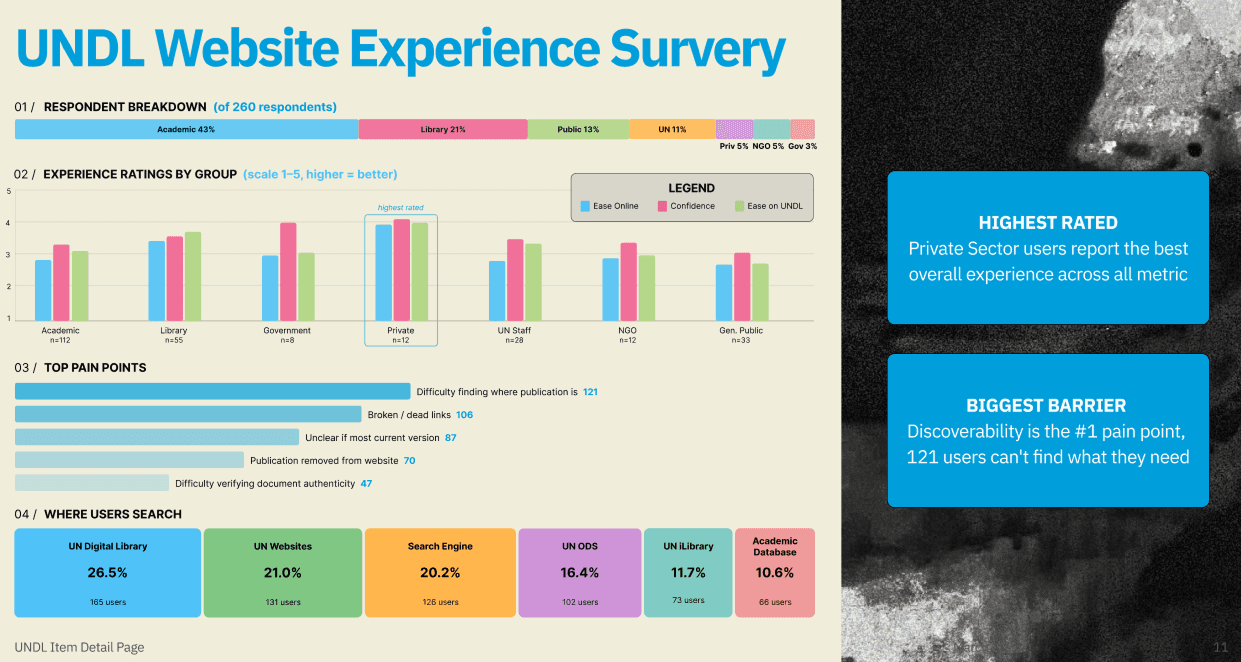
The self-administered online survey surfaced the top difficulties UNDL visitors experienced, adding another dimension to our analytics data. It also helped us narrow down which tasks were most critical to test.
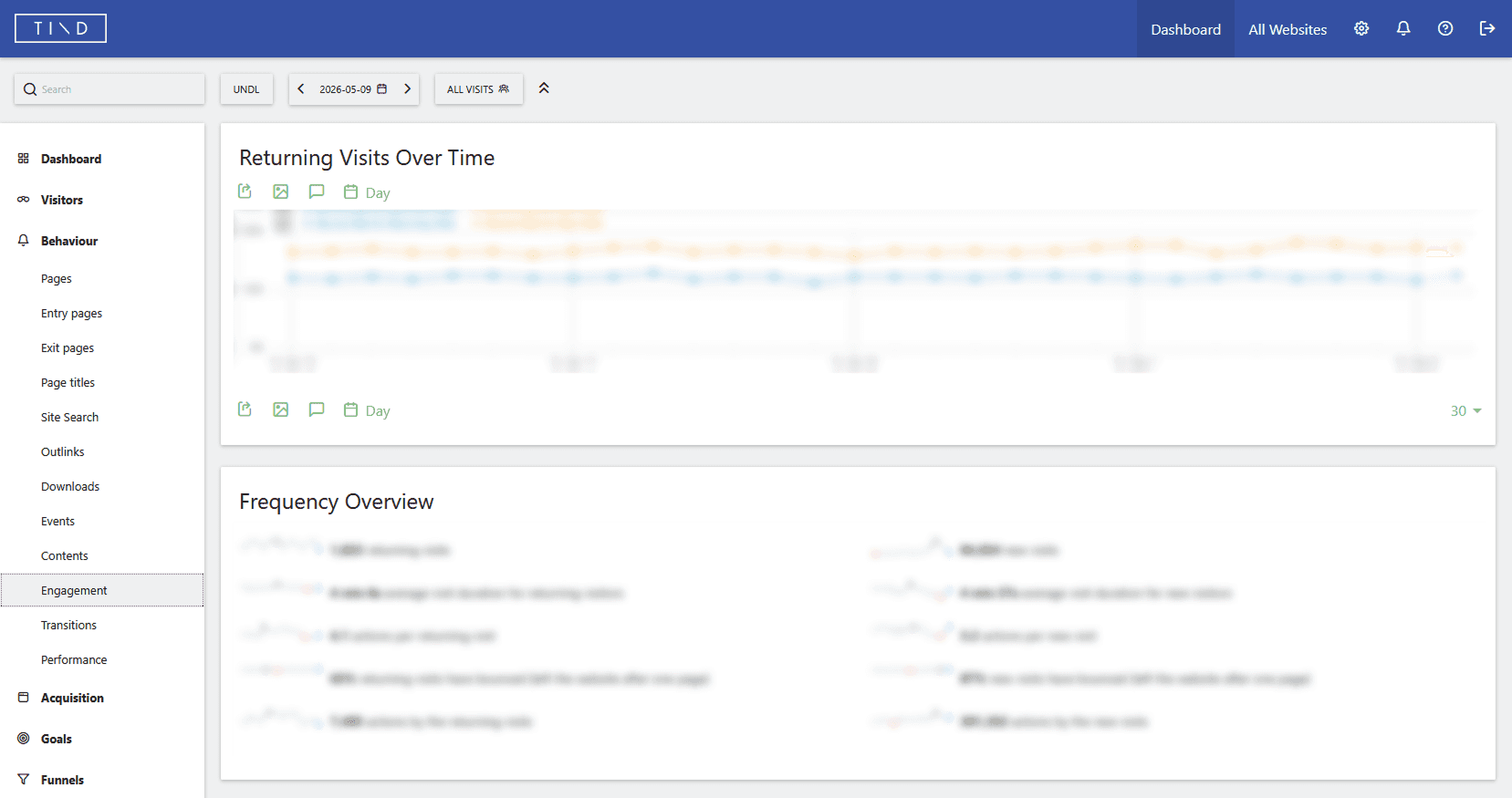
Observing engagement behavior on UNDL's Matomo (data blurred out at the request of the client)
A staff-guided tour of the stacks and digitization process gave us an inside look at how documents are located and cataloged. This grounded us in the logic behind their labeling system and surfaced key limitations, including the scale of redesign feasible for this study and the complexity of updating individual records. These constraints directly shaped our testing scope and the recommendations we could realistically offer.
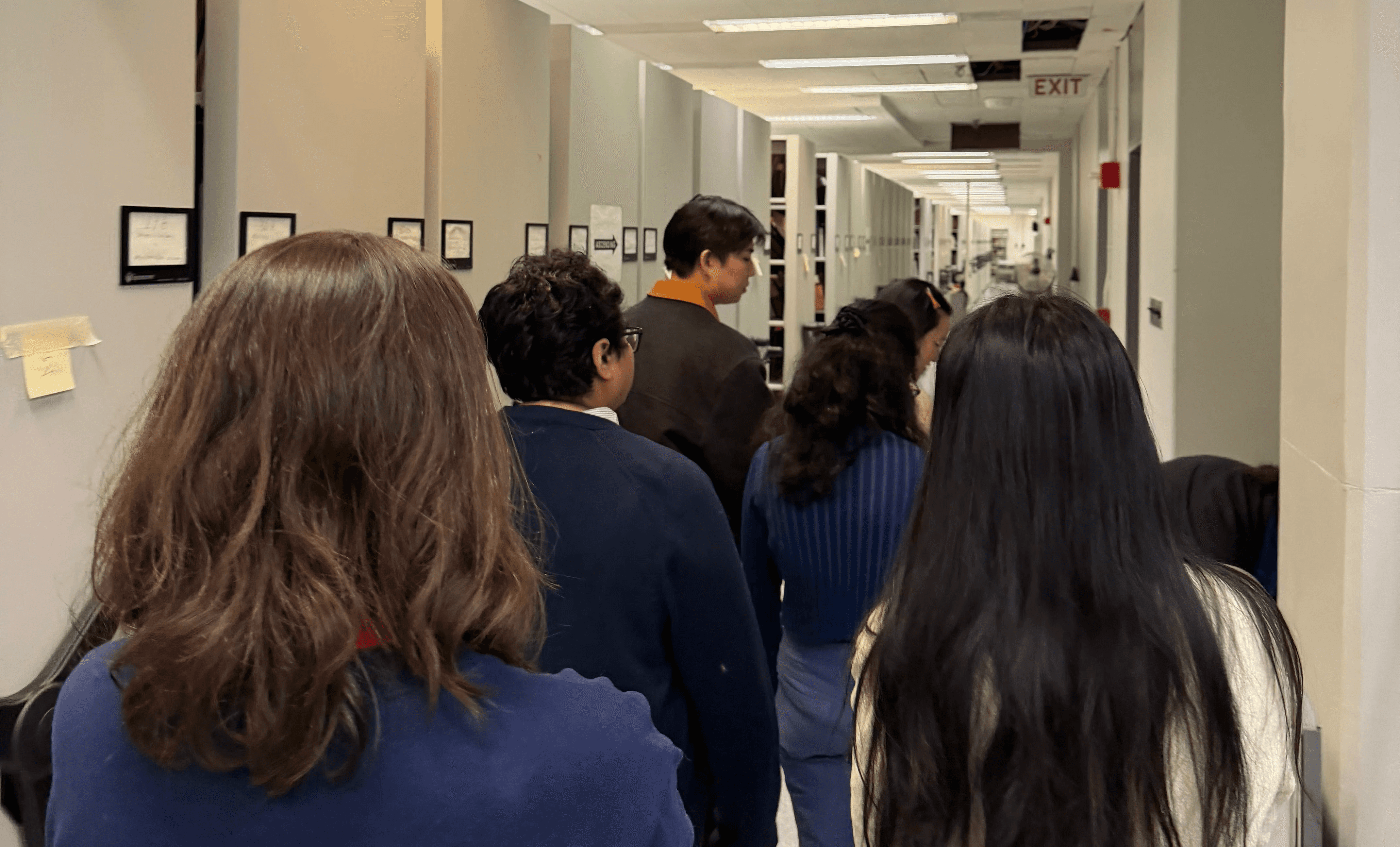
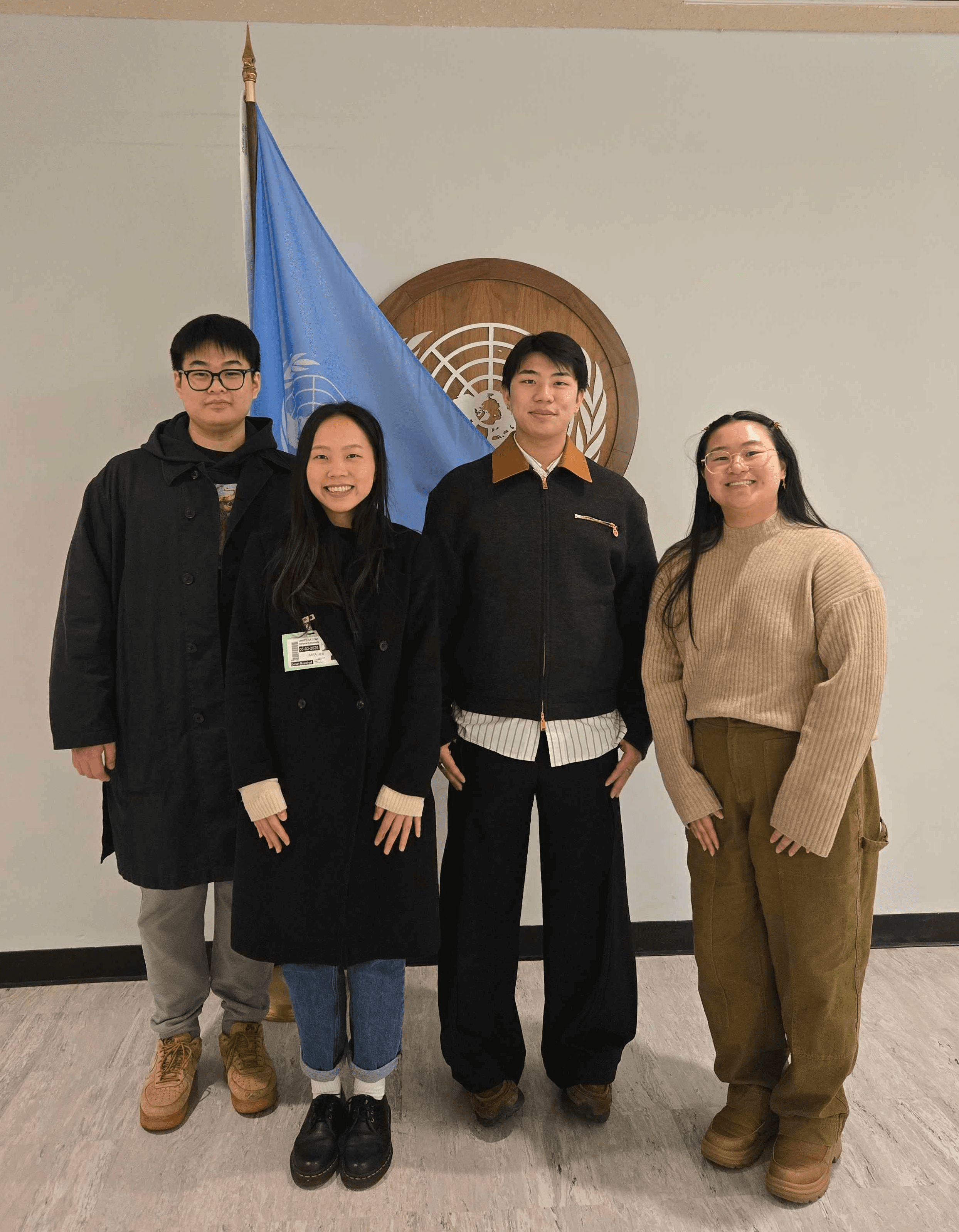
Visiting the United Nations to learn about the library's digitization efforts and labeling system.
Our team came up with 8 scenarios and tasks based on the data we got from Matomo, the UNDL website experience survey, client kick-off meeting, and top frequently asked questions about the IDP.
The UNDL was curious if general users would be able to pull from their own casual knowledge of library databases to understand the IDP.
About our 8 participants:
All participants mentioned they were comfortable with downloading files from a website. This is one of the main needs from the UNDL.
There was a mixed range of comfort with searching through a library database where four participants stated they did not feel comfortable, three were comfrtoable and one had neutral comfort.
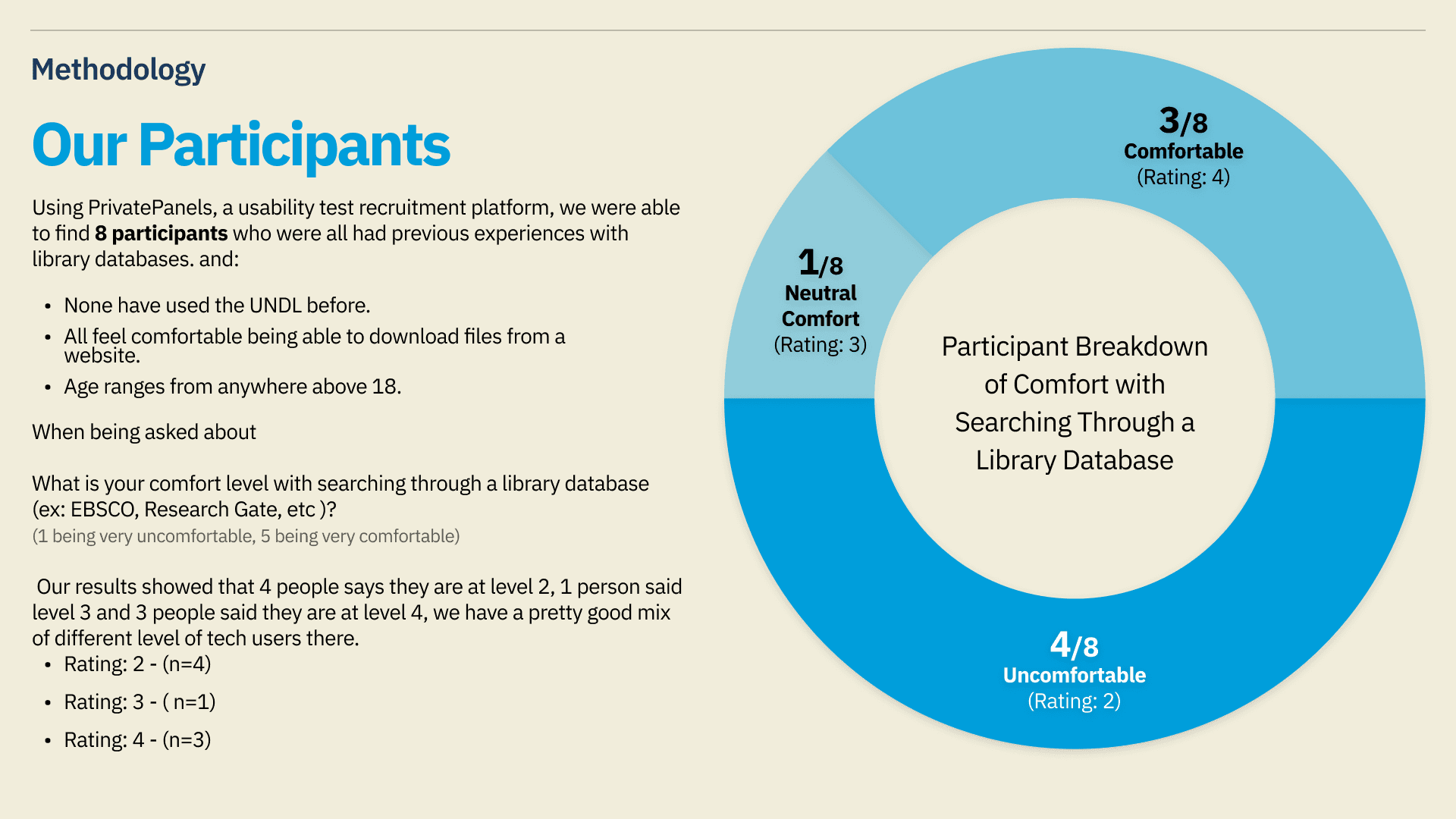
Participant breakdown of comfort with searching through a library database revealed a mix of comfort levels
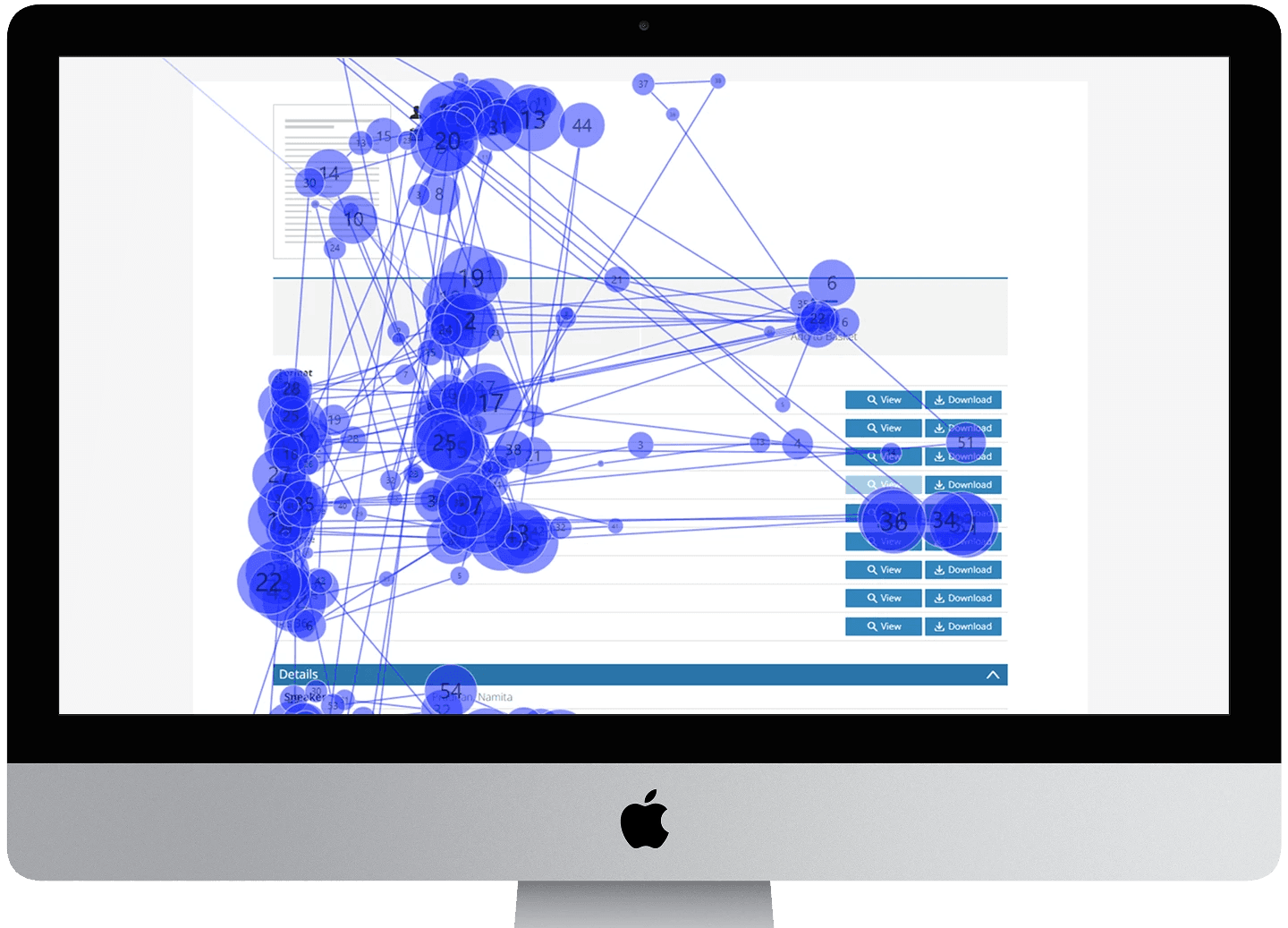
Moderating 8 usability sessions allowed us to directly observe how non-experts navigated the website. Eye tracking added an objective layer to our observations, revealing where users fixated their attention and how their gaze moved through the IDP. In the retrospective think-aloud, we asked users to watch their gaze replays and walk us through their thinking process. This gave us a window into their browsing and search behavior while opening the floor for follow-up questions.
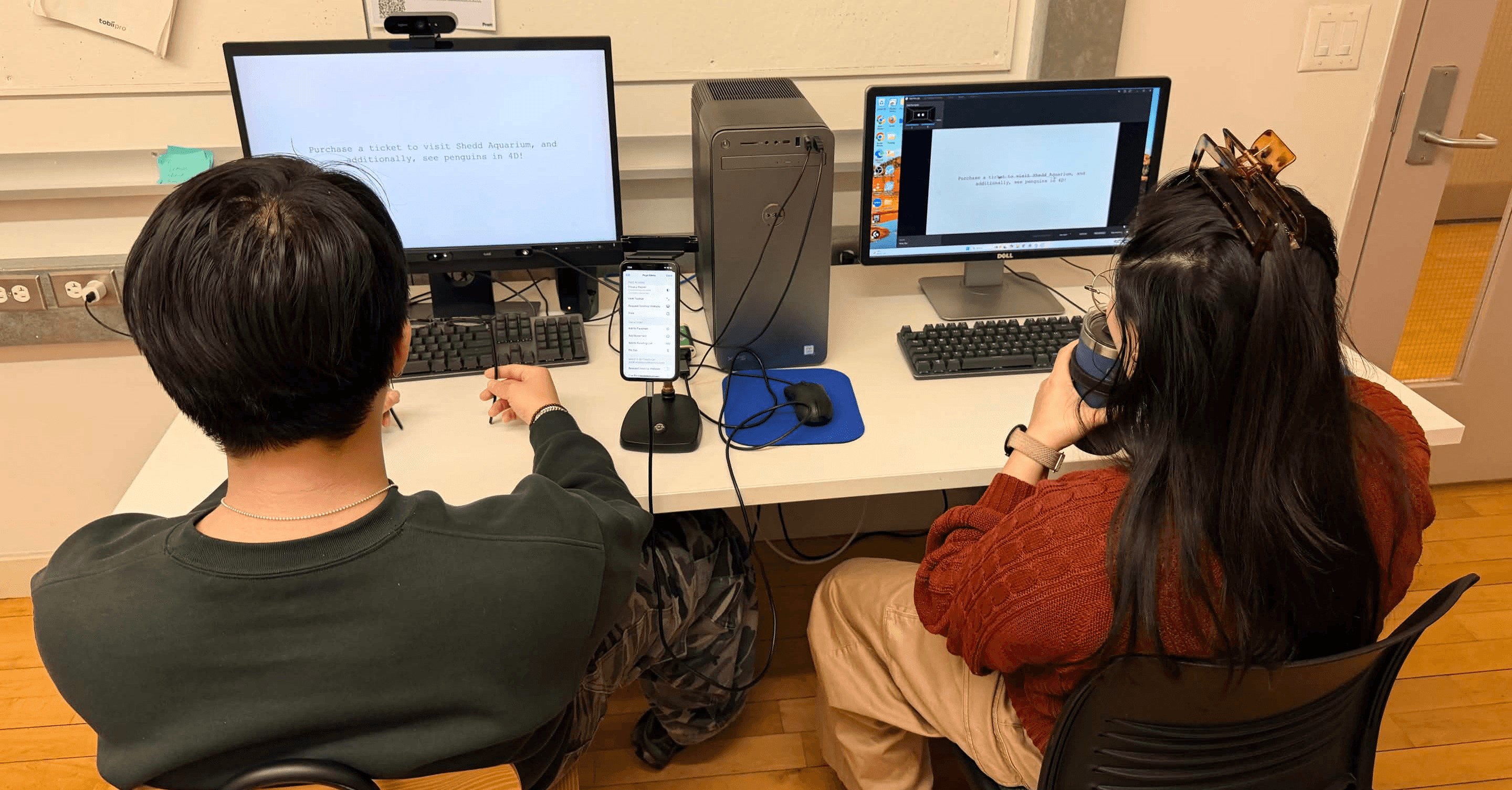
Moderating a usability test with eye-tracking to capture their navigation behavior and where they fixate on for each task
To complement our qualitative observations, we used the SUS to get a standardized measurement of the IDP's overall usability. This established a benchmark for the new user experience and gives the UNDL a reference point to measure future improvements against.
We also captured how users felt about completing each major task on the IDP. Beyond providing average difficulty ratings per task, it allowed us to probe further into why users struggled, adding depth to our quantitative data.
Observing engagement behavior on UNDL's Matomo (data blurred out at the request of the client)
After each session, our team debriefed and logged observations into a shared rainbow sheet, tracking patterns across participants as they emerged. Once all 8 sessions were complete, we consolidated repeated observations and assigned each issue a severity rating based on how significantly it impacted IDP use and how many participants experienced it:
1 = Cosmetic problem, low priority
2 = Minor usability problem
3 = Major usability problem, high priority
4 = Usability catastrophe, must fix
This process surfaced 36 total issues, each paired with an actionable recommendation.
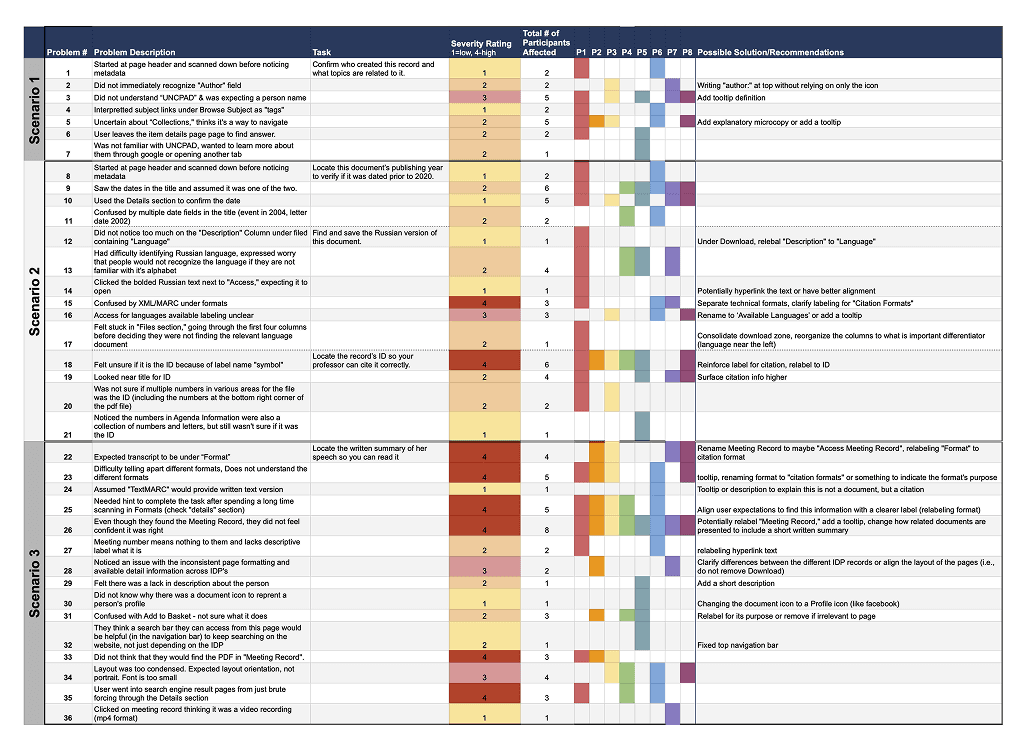
Problem list with 36 observations labeled by severity
We triangulated across all the data sources to understand both the what and the why. Analytics, survey results, and quantitative measures told us how often problems occurred and where attention was focused. Qualitative observations and retrospective think-aloud follow-ups told us why users struggled. Together, they gave us a complete, evidence-backed picture of the IDP experience.
While most participants were able to complete most of the tasks, the IDP received a SUS score of 46.4, well below the industry benchmark of 68. This signals that users perceived the IDP as difficult to use, falling short across effectiveness, efficiency, and satisfaction. The score reinforces the need for meaningful improvements to the IDP experience.
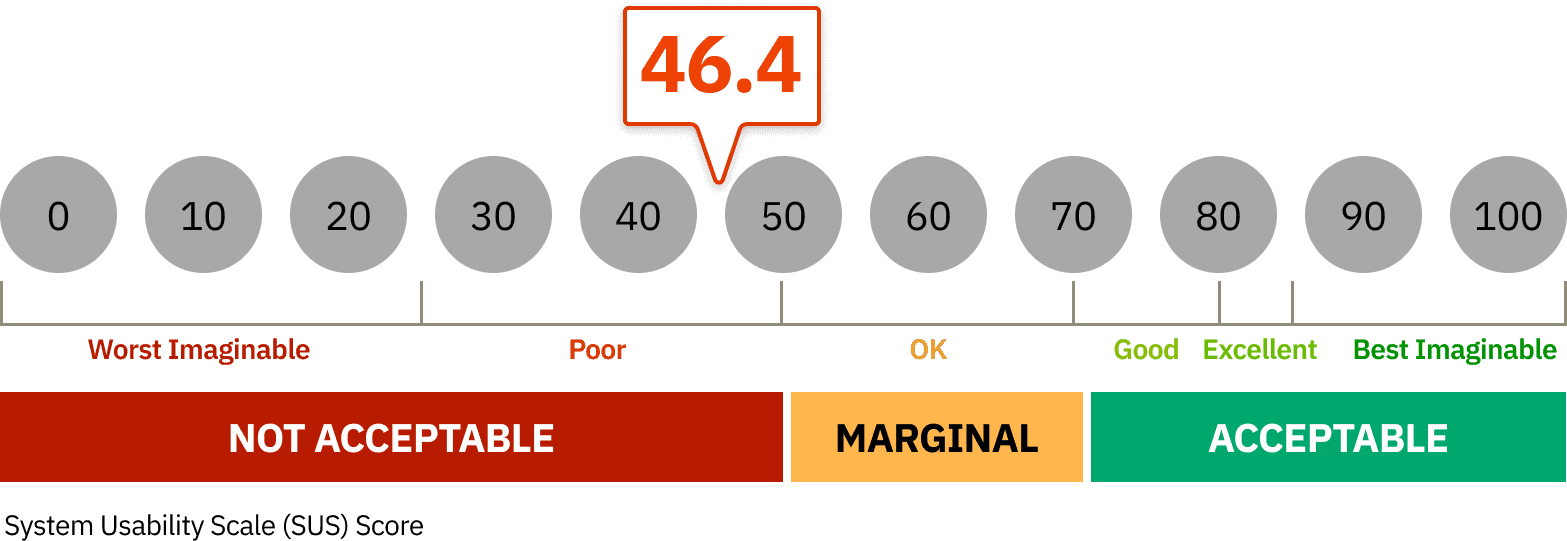
The UNDL got a SUS score of 46.4, which falls in the poor usability experience category and below the typical benchmark of 68.
During our usability test, we often saw participants struggle with understanding a lot of the UNDL’s labels and terminology. Some of the language on the IDP reflects the UNDL’s internal and bibliographic database logic rather than how general users naturally think about and describe these concepts.
Users began at the top of the page expecting to see an author's name. Instead, they were met with an unfamiliar UN acronym, leaving them uncertain and prompting them to dig into the Details section to confirm authorship.
5 out of 8 participants reported at the end of their session that they did not know what the acronym meant.
Without contextual support to explain the acronyms, users were left without a clear path to identify the author.
"I tried to find a person's name first - saw UNCTAD, which I think is a company, not a person's name so, I was left off guard at first. I had to make sure it was actually the author in by checking the details"
—P7
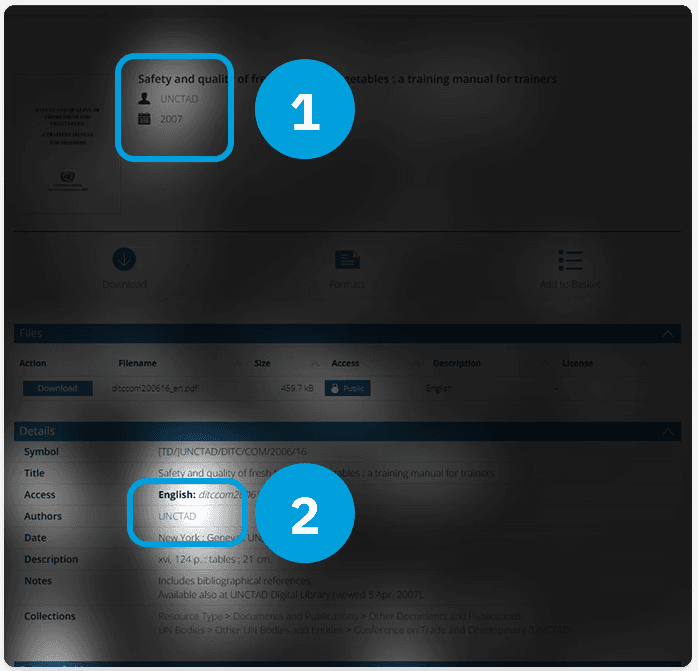
Compiled opacity map of all 8 participants - where most of the attention (lighter areas) is concentrated on the top and the Details section for the authorship.
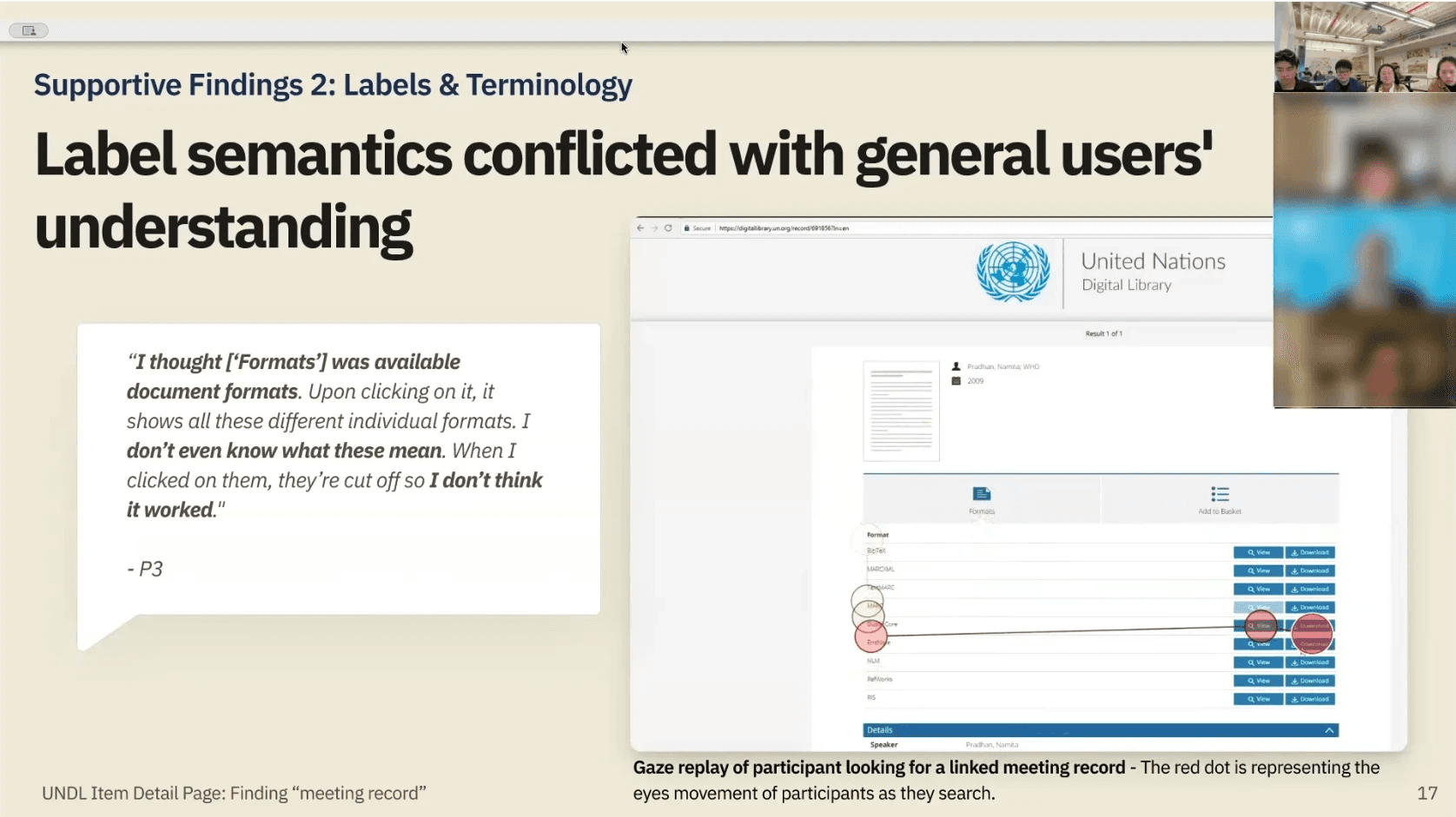
General public users brought their own interpretations to the IDP's labels, which often didn't align with UNDL's intended meaning. A clear example emerged around the "Formats" section: users assumed it was where they could choose a file format to download, such as a PDF or Word document. Instead, "Formats" contained bibliographic citation styles, which were unfamiliar and unhelpful to general users.
Most participants spent significant time in the Formats section without realizing this. When they opened a citation format, many were left wondering if the document itself was broken or unavailable.
Because users were unaware of the semantic meaning of symbol in this context, they were left confused and unsatisfied with their results.
“I thought [‘Formats’] was available document formats [but] I don’t even know what these mean. When I clicked on them, they’re cut off so I don’t think it worked."
—P3
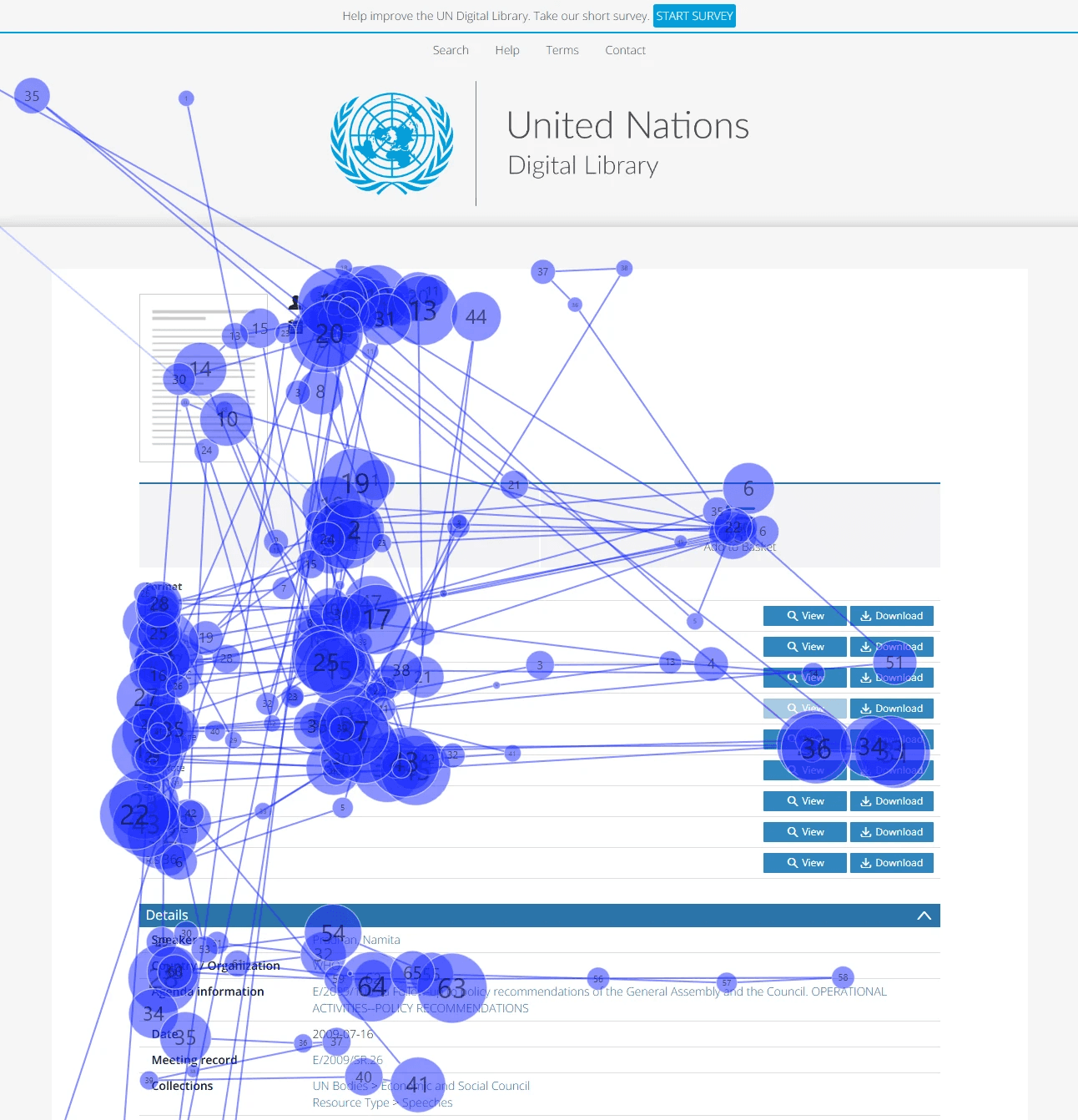
Across all 8 participants, uncertainty was a consistent theme. When asked to find an associated IDP (task 5), Users gravitated toward the Formats section, and many needed a hint from the moderator to look at the Details section. Even then, nothing on the page clearly indicated a path forward. Users resorted to a process of elimination, clicking links until something resembled what they were looking for.
5 out of 8 participants completed the task successfully, yet all 8 reported not feeling confident they were in the right place.
Participants rated this task as difficult (an average of 1.9 out of 7 in difficulty), and consistently described feeling lost and frustrated during the retrospective think-aloud.
When nothing feels recognizable, from the labels to the metadata to the layout, users can't trust their own success.
“I looked at the details but I didn’t understand which one I could click to get the [record]. It was frustrating."
—P6
Conducting a quick comparative analysis across external databases revealed that the UNDL relies more heavily on system-specific terminology than commonly used metadata language. We suggest to adopt more familiar terms to potentially reduce interpretation effort and improve clarity, navigation confidence, and trust.
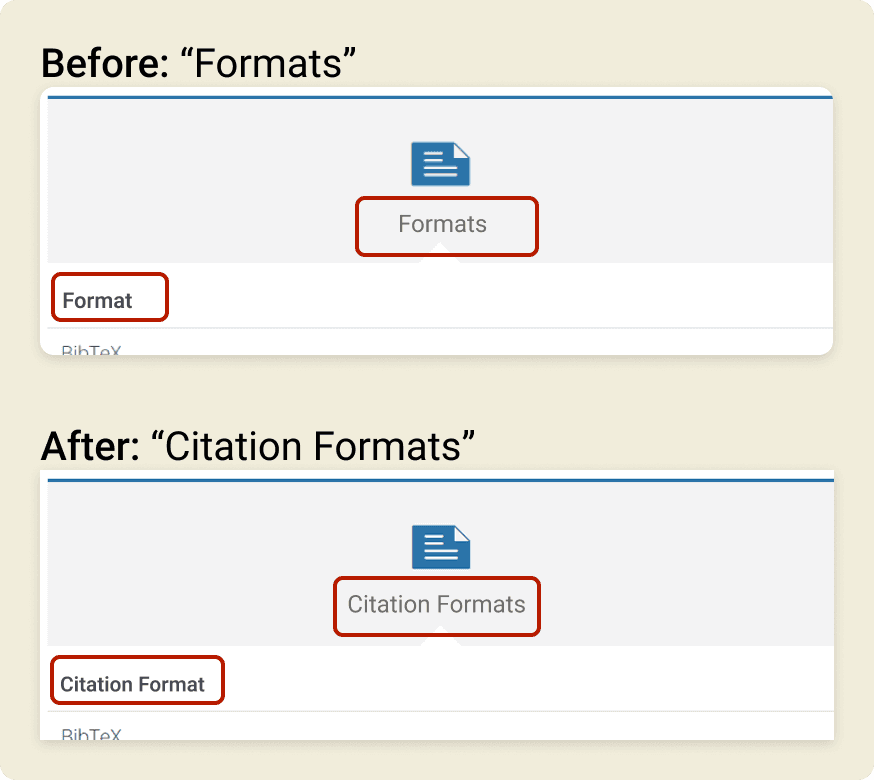
A simple example is replacing "Formats" with "Citation Formats." This immediately clarifies the feature's purpose and reduces the risk of users mistaking it for a file type selection. Small terminology changes like this can make the IDP significantly easier to understand at a glance, for experts and non-experts alike.
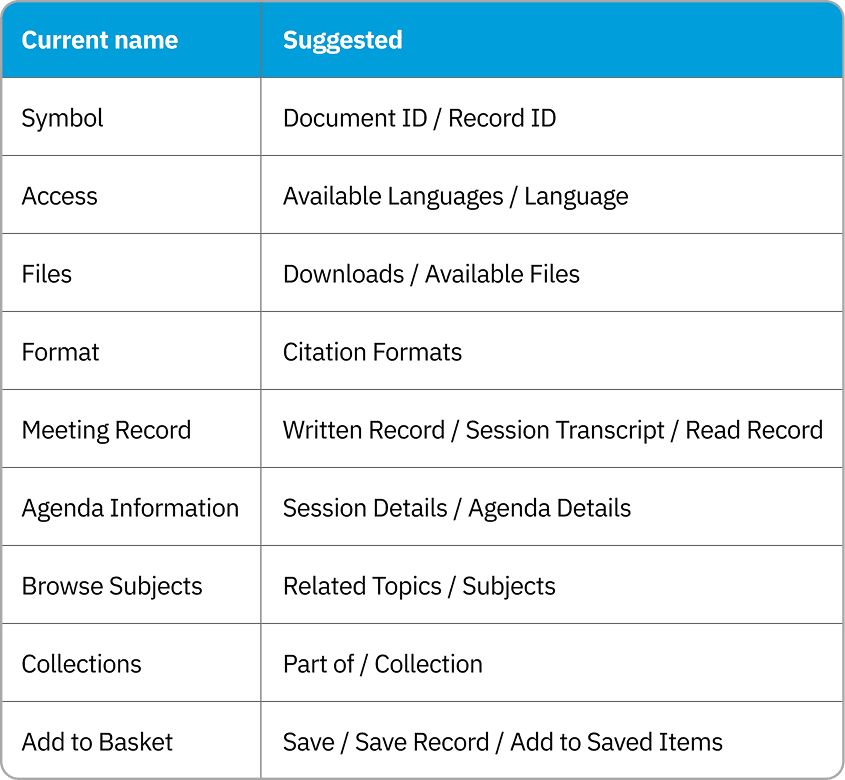
List of relabel suggestions to consider
Tooltips can support a label by providing in-context clarification exactly when users need it, helping them understand specialized terms without cluttering the page. While relabeling in plain language remains the stronger solution, tooltips are an effective measure that complements the existing layout and supports the current UNDL system.
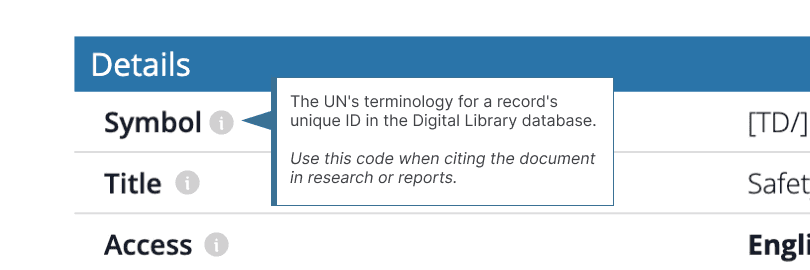
A mock-up of what a tooltip could look like for specialized UNDL labels
Our testing included two different IDP layouts, and users noticed. On the page without a downloadable document, but with access to an associated IDP, the missing "Download" button and absent title left users aware that something had changed, but unable to understand why. Rather than being guided towards "Meeting Records," they were left to orient themselves without context.
This may help explain why nearly half of survey respondents cited difficulty finding records as their top pain point. Users lose their footing when the layout changes without explanation
"There's no title. I don't actually know what this page is…the last one had a title."
—P2
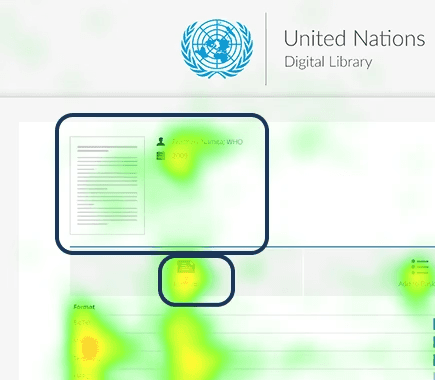
Compiled heat map of all 8 participants - participants mentioned they used the title to orient themselves and saw the download button for documents, but noticed it was missing on this IDP.
Half of our participants had pointed out that the IDP was difficult to read because of the small and condensed text .
Referencing Web Content Accessibility Guidelines, we confirmed that the IDP's descriptive text does not meet the recommended font size and weight standards. This makes readability an accessibility concern beyond just user preferences for font styles.
"It's all very condensed. A lot of tiny text."
—P3
"The text could be bigger. [It's] too small."
—P6
While layout differences across IDP types are complex, consistency is key for user confidence. Users come to the IDP typically expecting to find a digital document, but not all records have been digitally uploaded to the system, and some IDPs exist soley to direct users to a related IDP that contains a document. Rather than removing the button entirely, we recommend introducing a disabled button state to signal when a document is unavailable. Paired with a tooltip, this gives users a clear reason for the limitation and a natural path forward. The tooltip can direct users to contact a librarian for documents that have not yet been digitally uploaded.
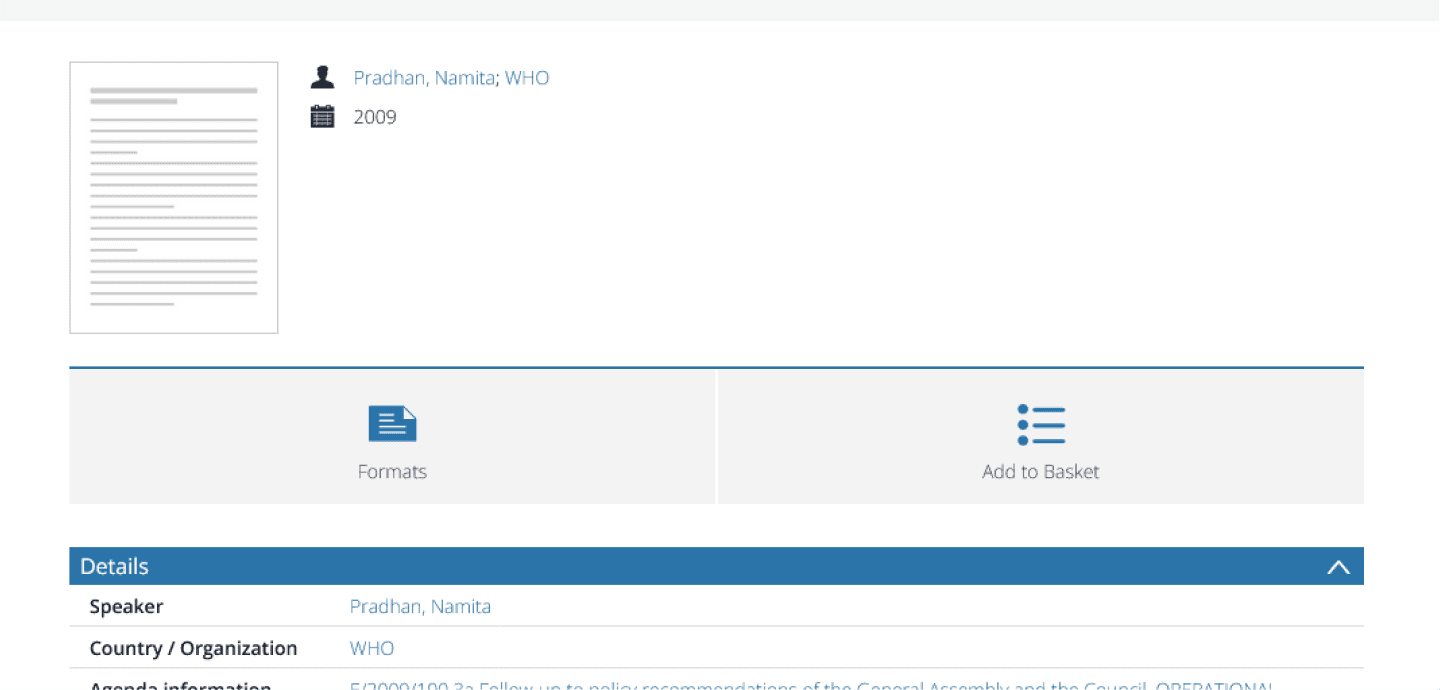
Before: An IDP with a different layout because it does not have a downloadable document.
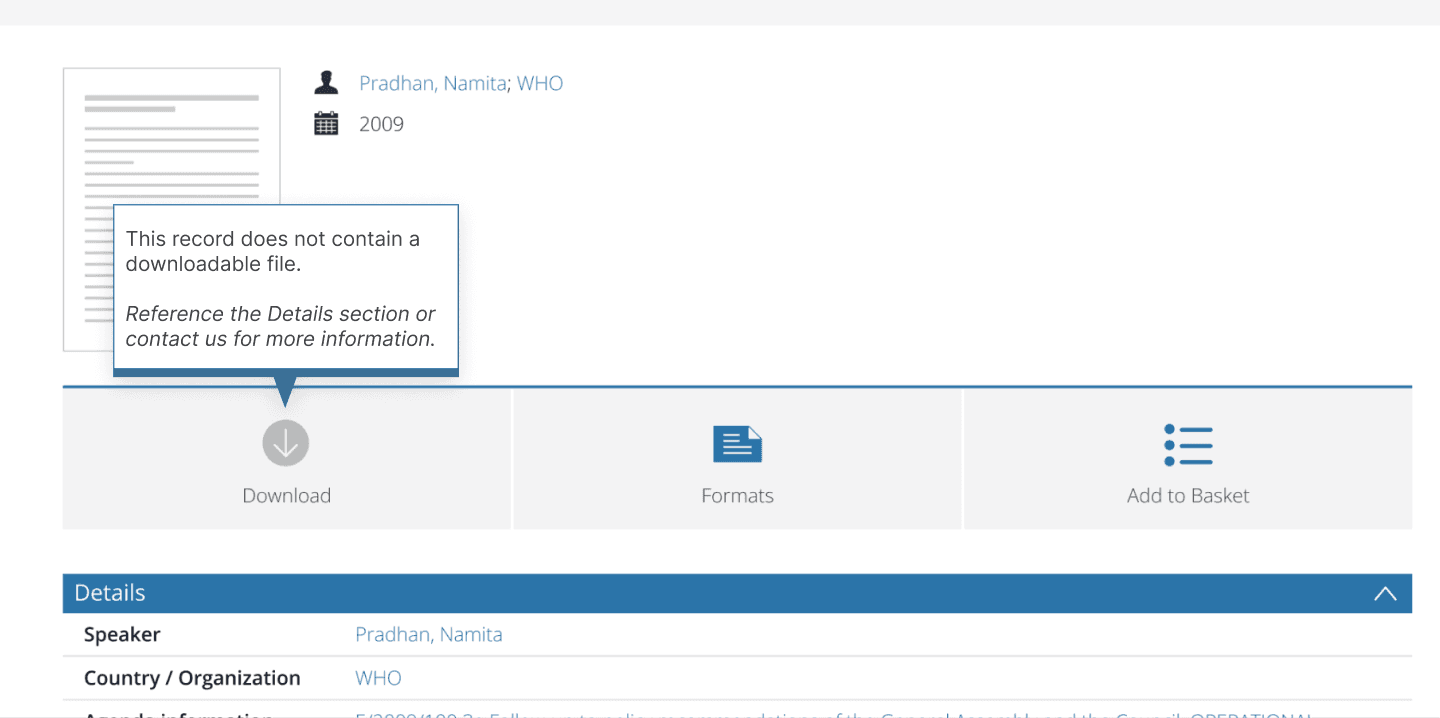
After: An IDP with a disabled "Download" button to indicate there is no document, and tooltip that guides users where to go next
The IDP's descriptive text currently sits at 12px with an extra light weight of 200, falling short of accessibility standards. We recommend increasing the font size to a minimum of 14px and the weight to at least 400. Headers should be scaled accordingly to maintain a clear information hierarchy. These changes improve both readability and WCAG compliance without altering the overall layout.
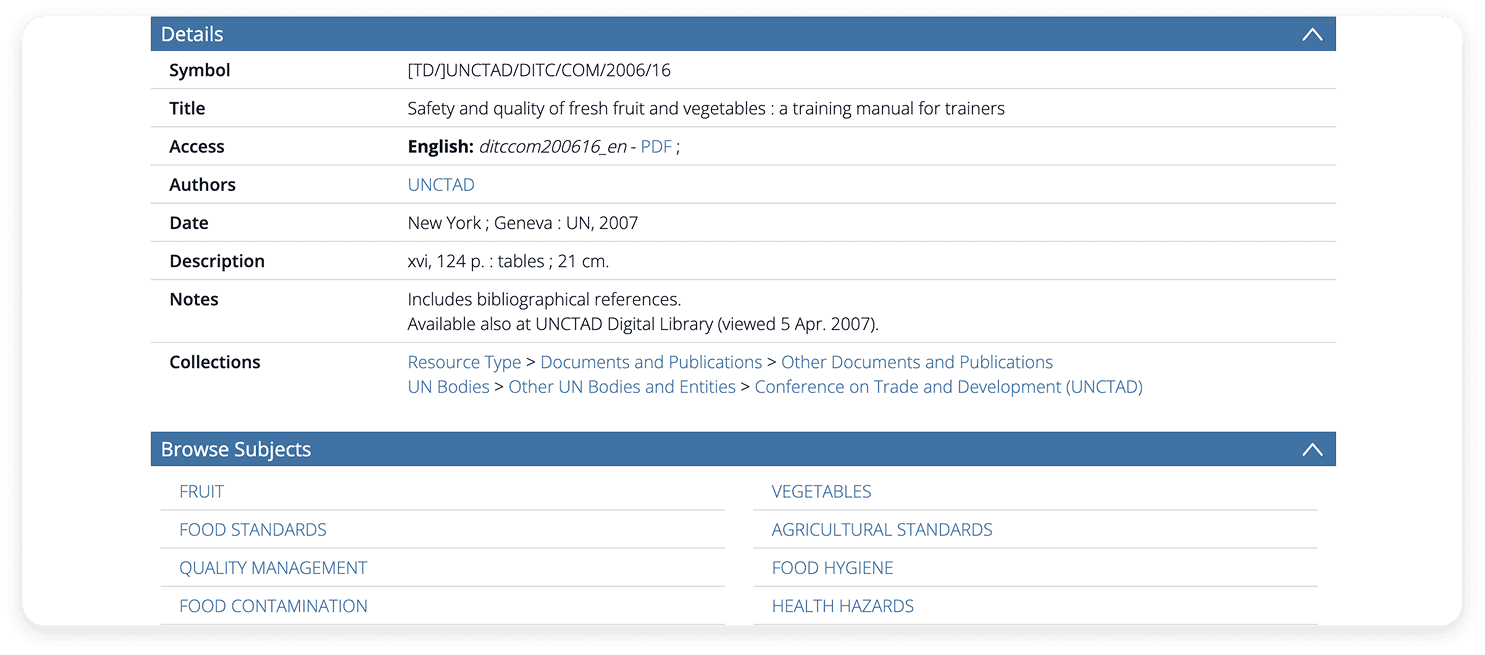
Before: The font size starts at 12px and the weight is 200 (extra light) making the IDP content difficult to read
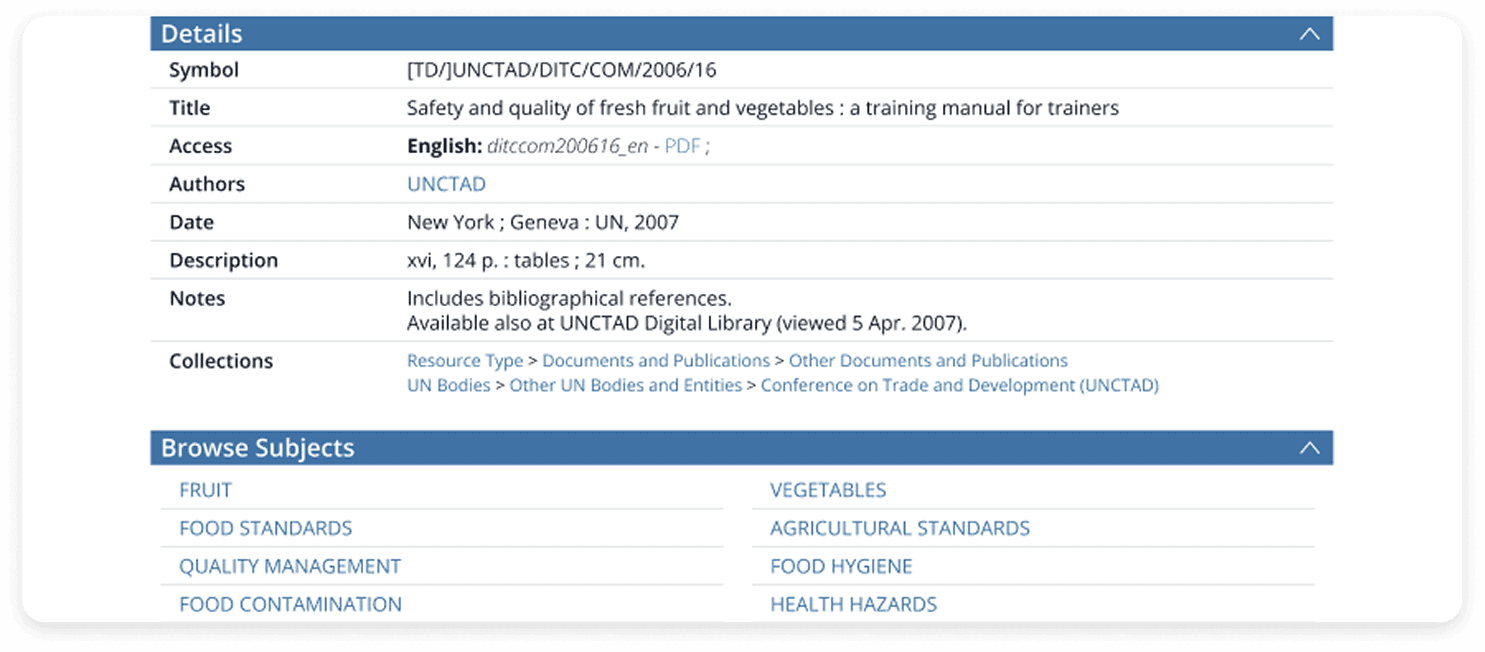
After: The minimum font size now at 14px and weight at 400 improves readability of the IDP
We delivered our findings to the UNDL staff, including the Chief of Information Management Section, to a positive reception. The team was struck by how small, targeted changes could significantly improve the user experience. For a team deeply embedded in the system, hearing directly how outside users navigated the page and traced the source of their most frequently asked questions offered a perspective they hadn't had before.
The UNDL plans to use our findings to drive improvements to the IDP and has expressed interest in having us present to the broader library and tech department to align the full team around the research.
Our team presenting our research and recommendations to the UNDL
Matomo, the UNDL's existing analytics platform, offers a built-in A/B testing feature that could be used to validate our recommendations without additional tooling. A strong first test would be introducing the disabled "Download" button state with a tooltip, measuring whether consistent layout improves user confidence and navigation.
Primary Metric: Click behavior on the IDP, where we expect fewer multi-clicks as users more quickly understand the page
Secondary Metric: Decrease in customer support inquiries about finding documents
Secondary Metric (long term indicator): An increase in requests for digitally unavailable documents, suggesting users are successfully discovering the librarian contact pathway
Guardrail: Increase in support inquiries about formats or downloads, signaling the change may need further refinement
Triangulating data across multiple methods felt daunting at first, but once we began synthesizing, it became one of the most rewarding parts of the process. Building the full picture from multiple data sources made our findings feel airtight, and every discovery was backed by evidence from more than one place. As someone who has always leaned qualitative, this project deepened my appreciation for mixed methods research and has me excited to keep building my quantitative analysis skills.
⭐ Improvement is always possible, even with legacy systems
The on-site visit and conversations with UNDL staff helped me fully understand the project's scope and the boundaries of what we could realistically recommend. Working within an established legacy system didn't mean improvement was off the table. It only meant we had to be strategic about it! Highlighting both short-term wins and long-term goals for the IDP's design ensured our recommendations were actionable within the system's existing framework, not just idealistic suggestions.
Team 88Research - we're being diplomatic!